
Buy SBI FASTag Online - Overview, How to apply & Recharge
SBI FASTag
India’s oldest and largest public sector bank founded in 1806, launched SBI FASTag to make highway travel faster and cashless. Using RFID technology, it auto deducts toll charges from your prepaid balance and can be easily recharged through SBI net banking, UPI, debit or credit cards.
Key Takeaways
- Complete overview of SBI FASTag
- Step-by-step application process and required documentation
- FASTag recharge methods and available payment options
- Details on FASTag charges, deposits, validity, fees, and recharge limits
- Monthly and annual FASTag pass options
- How to check your FASTag balance
- Process for deactivation and requesting a refund
- How to contact SBI FASTag customer support
- FAQs
Overview
SBI FASTag is a tag that uses RFID technology to pay the toll automatically when your vehicle passes through a toll plaza. You don’t have to stop or pay with cash. The money is taken directly from your SBI account or prepaid wallet linked to the FASTag. FASTag works at more than 600 toll plazas across India, so you can travel on highways more easily and save your time. You can get FAStag online from the official website. To apply, just fill a form and upload some documents like your vehicle paper (RC), a small photo, and an ID proof like an Aadhaar card. After you pay the fees, the tag will be sent to your home. When you start using FASTag, you will get an SMS every time money is deducted from your account. You can also check your toll spending online. FASTag makes your travel faster, easier, and more secure.
How to apply/register SBI FASTag Online?
Online Registration:
- Visit the SBI Bank FASTag online registration portal.
- Fill in your personal and vehicle details.
- Upload the needed documents:
- Vehicle Registration Certificate (RC)
- Photograph passport-size
- KYC documents (PAN card or Aadhaar card).
- Make the payment for the applicable fees.
- The FASTag will be delivered to your registered address.
Offline Registration: You can also apply for the SBI Bank FASTag by visiting any SBI Bank branch with the necessary documents mentioned above. You can also get it from SBI agents sitting at toll plazas. Show your documents, and they will help you get it easily.
What are the charges & fees for SBI FASTag?
If you have a personal vehicle like a car, jeep, or van, getting an SBI FASTag. You need to pay 100 for the tag, 200 as a security deposit (which you’ll get back when you close the tag), and 100 as a minimum balance. So, the total amount you need to pay to get the FASTag is 400(Amount in Rs). The security amount depends on your vehicle type and will be returned to you when you close your FASTag account.
As per the information collected from the official website of SBI FASTag, below is the charges mentioned in detail:
Sr. No. | Vehicle Class No. | Particulars | Tag Cost | Security Amount (Refundable) | Minimum Balance | Total |
|---|---|---|---|---|---|---|
1 | 4 | Car / Jeep / Van/ Tata Ace and similar mini light commercial vehicle | 100 | 200 | 100 (First Time Issuance Top up only) | 400 |
2 | 5 | Light Commercial Vehicle | 100 | 300 | 300 | 700 |
3 | 6 | Three Axle Commercial Vehicles | 100 | 300 | 300 | 700 |
How to do SBI FASTag Recharge?
If you are an SBI Bank FASTag customer, here’s the quickest and easiest way to recharge your FASTag:
1. Quick Recharge and Fastag Recharge using UPI Mobile Apps
You can not do a quick recharge on the SBI FASTag portal, but it is easy to recharge using any UPI app like Google Pay, PhonePe, Paytm, or BHIM.
Using UPI ID:
- Open UPI apps like Google Pay, PhonePe, or Paytm etc.
- Select ‘Pay by UPI ID’.
- Enter your vehicle number.
- Enter the recharge amount and complete the payment.
2. Login & Recharge via SBI Net Banking
- Log in to your SBI Bank NetBanking.
- Go to ‘BILLS AND RECHARGES’ and select ‘FASTAG RECHARGE’.
- Select ‘FASTag Recharge’ from the list of billers.
- Choose the issuer bank as: STATE BANK OF INDIA – NETC FASTAG
- Enter your vehicle number and Click on ‘Proceed’ to continue.
- Enter the amount you want to recharge (minimum 100).
- Confirm the payment and click ‘Submit’.
- Once payment is done the amount will be credited to your FASTag account.
3. SBI BANK YONO
- Open the app, log in, navigate to “YONO Pay”.
- Select FASTag under Quick Payments.
- Choose your payment method (UPI is often preferred).
- Enter the recharge amount and complete the transaction.
4. At Toll Plaza (Cash Recharge)
- Visit the Point-of-Sale (POS) counter at any toll plaza.
- Provide your VRN and request a recharge.
- Pay in cash, and the executive will add the amount to your FASTag account.
How to do SBI FASTag Balance Check?
Missed call: Give a missed call to +91-8884333331 from your registered mobile number.
SMS Alerts: Get SMS alerts for toll cuts and see your remaining balance updates.
Email Notifications: Get regular emails on your toll payments and balance at your registered email ID.
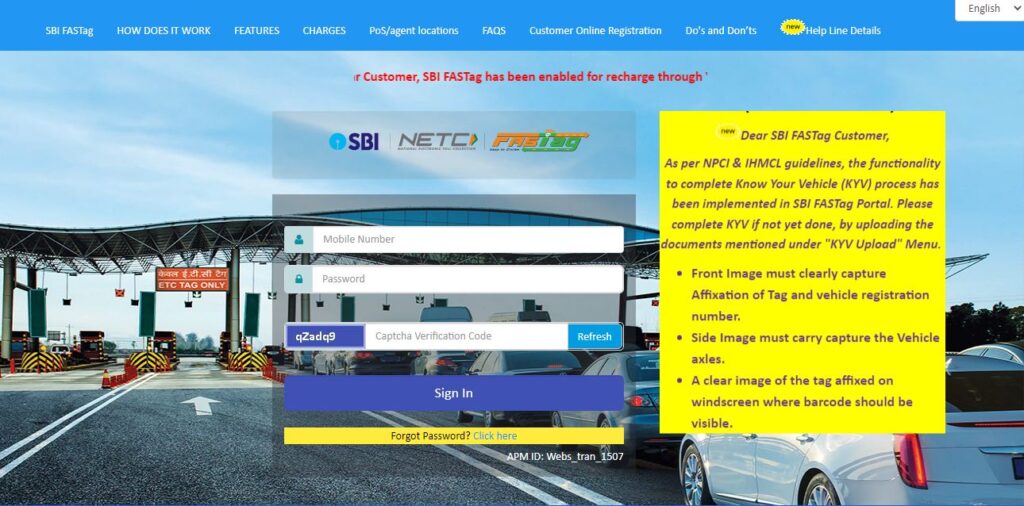
SBI FASTag Portal: Go to the SBI FASTag website and log in with your details to check your balance and all toll transactions.
My FASTag App:
- Download the ‘My FASTag’ app from the Play Store or App Store.
- Tap on ‘Log on to Bank Portal’ and choose ‘SBI’ from the list.
- Enter your VRN and registered mobile number to open your FASTag account.
How to contact SBI FASTag Customer Care Support?
Call 1800 11 0018 or email [email protected] for any SBI FASTag customer support help.
How to submit a grievance/complaint about SBI FASTag?
To complain about SBI FASTag, call 1800 11 0018 or send an email to [email protected] with your vehicle number and issue.
How to deactivate/close SBI FASTag?
To close your SBI FASTag, just call 1800 11 0018 or email [email protected] with your vehicle number and request for deactivation.
FAQs
What if the FASTag doesn’t scan at the toll?
You may pay in cash and later raise a complaint with YES Bank.
Can I use one FASTag for two vehicles?
No, one FASTag is valid for one vehicle only.
Can I apply for SBI Bank FASTag without an SBI Bank account?
Yes, you can apply for SBI Bank FASTag even if you don’t have an account with SBI Bank.
Is SBI FASTag mandatory?
Yes, FASTag is mandatory for all four-wheelers at toll plazas in India.
SBI Bank FASTag
The SBI FASTag, a prepaid, rechargeable RFID tag linked to your SBI account, can make travel on highways more seamless. It allows you to get through almost any toll plaza without stopping to pay (and it saves time and fuel !). SBI FASTag is issued under the NETC program and is accepted at most toll plazas across India. Users can recharge their fast tags online using debit/credit card, net banking or IMPS. When transactions happen, the user also gets an SMS alert. SBI provides a web portal and a mobile app to manage their FASTag accounts. A new design for Class‑4 vehicles was recently introduced to improve toll lane recognition and minimize incorrect charges.
MORE INFORMATION COMING SOON…
We’re working on it. Please check back later.