
Buy IndusInd Bank FASTag Online - Overview, How to apply & Recharge
IndusInd Bank Fastag
IndusInd Bank FASTag is a tiny sticker placed on your vehicle’s glass that lets you pay tolls without stopping. It works through radio signals and takes the amount from your linked wallet or bank automatically. You can get it easily from IndusInd Bank’s website or branch by giving your ID and vehicle details. The tag costs ₹100, and there’s a returnable deposit based on the vehicle type. You can add money anytime using UPI, card, or online banking, and you’ll get messages whenever a toll is deducted.
Key Takeaways
- Complete overview of IndusInd Bank FASTag
- Step-by-step application process and required documentation
- FASTag recharge methods and available payment options
- Details on FASTag charges, deposits, validity, fees, and recharge limits
- Monthly and annual FASTag pass options
- How to check your FASTag balance
- Process for deactivation and requesting a refund
- How to contact IndusInd Bank FASTag customer support
- FAQs
Overview
IndusInd Bank is a well-known private bank in India that started in 1994. The name comes from the Indus Valley Civilization, showing the country’s old and rich culture. Over the years, the bank has grown fast and is known for its good customer service and modern banking options. It offers everything from savings accounts and loans to online and mobile banking. One of its helpful services is the IndusInd Bank FASTag. It’s a small tag that sticks on your vehicle’s glass and lets you pay tolls automatically while driving through highways. The money is taken directly from your linked account, so you don’t have to stop and pay cash. You can get the FASTag online or from any IndusInd Bank branch and recharge it easily using UPI or net banking. It saves time, fuel, and makes travel much smoother.
How to apply/register IndusInd Bank FASTag Online?
Online:
- Go to the IndusInd Bank FASTag website.
- Fill in your basic details like name and vehicle number.
- Upload your RC copy, ID proof (Aadhaar or PAN), address proof, and a small photo.
- Make the payment online using UPI, debit card, or net banking.
- Once your details are verified, your FASTag will be sent to your home by post.
Branch: You can also visit the nearest IndusInd Bank branch with your RC and ID proof. The staff there will help you complete the form and get your FASTag.
Toll Plaza: FASTags are also available at some toll plazas. Just carry your RC and ID proof, and you can buy one on the spot.
Mobile App: If you use the IndusMobile app, you can apply for a FASTag there too. It’s simple and quick, and your tag will be delivered to your address.
What are the charges & fees for IndusInd Bank FASTag?
IndusInd Bank FASTag charges are quite easy to understand. You just pay a one-time fee of ₹100, which already includes GST. Along with that, there’s a refundable deposit that changes depending on your vehicle type. You also need to keep a small balance in your FASTag account so it stays active and works smoothly at tolls.
Sr. No. | Vehicle Class No. |
Particulars |
Tag Cost | Security Amount (Refundable) |
Minimum Balance |
Total |
|---|---|---|---|---|---|---|
1 |
4 | Car / Jeep / Van/ Tata Ace and similar mini light commercial vehicle |
100 |
200 |
100 |
400 |
2 | 5 | Light Commercial Vehicle | 100 | 300 | 150 | 550 |
3 | 6 | Three Axle Commercial Vehicles | 100 | 400 | 300 | 800 |
How to do IndusInd Bank FASTag Recharge?
Through IndusInd FASTag Website
- Open the link given above and Click on Login and enter your mobile number.
- Verify with the OTP and log in to your account.
- Select Wallet Recharge and enter the amount.
- Pay using your debit card, credit card, or net banking.
- Once done, the money will be added to your FASTag wallet.
Using UPI
- Open any UPI app like Google Pay or PhonePe.
- Enter your FASTag UPI ID as NETC.VehicleNumber@Indus (for example, NETC.DL01AB1234@Indus).
- Type the amount and complete the payment.
- The balance gets updated almost instantly.
Through BBPS
- Go to your mobile banking app or any BBPS-enabled app.
- Choose FASTag Recharge and select IndusInd Bank.
- Enter your vehicle number and pay the amount.
Auto Top-Up
- Open the link given above and Turn on Auto Top-Up and set a limit and recharge amount.
- Whenever your balance goes low, it will recharge automatically.
POS or Toll Plaza
- Visit any IndusInd Bank partner outlet or toll plaza.
- Give your vehicle number and mobile number.
- Pay the amount, and your FASTag will be recharged within minutes.
How to do IndusInd Bank FASTag Balance Check?
Missed Call: Give a missed call to 88848 00008 from your registered mobile number, and you’ll get your FASTag balance instantly.
SMS Alerts: You’ll receive a text message after every toll payment or recharge showing your updated balance.
Portal: Visit fastag.indusind and log in with your mobile number to check your balance and recent transactions.
Mobile App: Open the IndusMobile app, tap on the FASTag section, and you can view your balance there.
Customer Care: You can also call 1860 210 8887 to ask about your FASTag balance or any related issue.
How to contact IndusInd Bank FASTag Customer Care Support?
Customer Care: You can call 1860 210 8887 for any help with your FASTag like balance, recharge, or other issues.
Email: Send an email to [email protected] if you have any questions or problems.
Bank Branch: Visit the nearest branch and the staff will help you with your FASTag.
Portal: Open the link again above and check the Contact Us section for support.
How to submit a grievance/complaint about IndusInd Bank FASTag?
Portal: Open the link given above, click on Raise Complaint, and fill in your details to report the issue.
Customer Care: You can call 1860 210 8887 and tell the support team about your issue.
Toll Helpline: If the problem is at a toll plaza, call 1033 and report it.
Branch: You can also visit the nearest bank branch and give a written complaint.
How to deactivate/close IndusInd Bank FASTag?
Online: log in, and open the Tag Closing option. Select your tag, confirm with the OTP, and submit the request. It usually gets closed in 2 days.
Customer Care: Call 1860 210 8887 and ask the support team to deactivate your FASTag.
Branch: Visit the nearest IndusInd Bank branch with your ID and vehicle details, and ask them to close your tag.
Refund: Once your tag is closed, the security deposit and remaining balance will be refunded to your linked account.
FAQs
What happens if there’s a wrong toll deduction?
You can report it through the FASTag portal or by calling customer care. The extra amount will be refunded after checking.
How long does it take to get the FASTag online?
After applying, your FASTag is usually delivered to your home within 3 to 5 working days.
Can I use my FASTag for parking payments?
Yes, many parking areas in cities and malls also accept FASTag for cashless entry and exit.
Where can I use IndusInd Bank FASTag?
It can be used at over 1,300+ toll plazas across India on both national and state highways.
IndusInd Bank FASTag
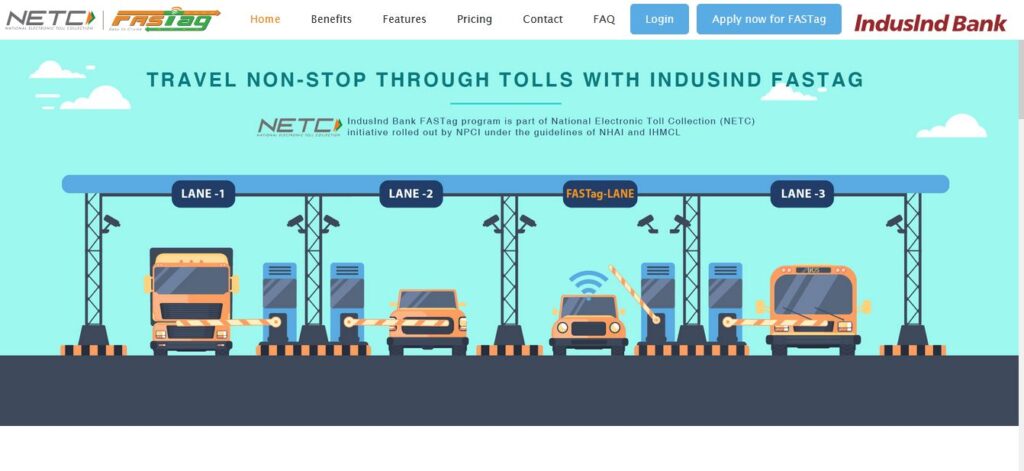
IndusInd Bank is a part of the National Electronic Toll Collection (NETC) operation and the FASTag is an RFID enabled tag that the NETC uses to get through toll plazas using prepaid wallets. FASTag allows cars, trucks and buses (all vehicles) to drive through the toll zone rather than having to stop and pay. It gives customers time, saves gas and reduces stress due to unnecessary traffic congestion.
IndusInd Bank has FASTag at 1300+ toll plazas and the devices are compatible and consistent across India. It’s fully digital and can be operated from multiple devices and platforms. Along with the trust of 3.1 million users, IndusInd Bank is viewed as a custodian of secure, transparent transactions with real-time information of toll history and balances on the tag. Ideal for private or fleet utilization, it creates a seamless and comfortable travel experience, especially for the long-distance commuter.
MORE INFORMATION COMING SOON…
We’re working on it. Please check back later.